Solidity Hello World with Ethereum Wallet
Welcome to the classic Helloworld Solidity contract class using Ethereum Wallet. In this class we’ll.
What you will learn
- Where solidity hello world with ethereum wallet fits into an Ethereum application.
- Which assumptions should be tested before a mainnet deployment.
- What to read next when this concept is working.
Welcome to the classic Helloworld Solidity contract class using Ethereum Wallet. In this class we’ll see how to write a simple contract and deploy it on the block chain. We’ll also see how to interact with our contract by sending and reading data.
The syntax for a contract in Solidity is really similar to a class in oriented object programming languages. A contract have functions we can call and variables we can store and read.
Key-handling choices can be tested against the private-key custody and recovery guide for Bitcoin.
Our Counter contract will store the number of times it has been called and make the value available for everyone to read on the blockchain.
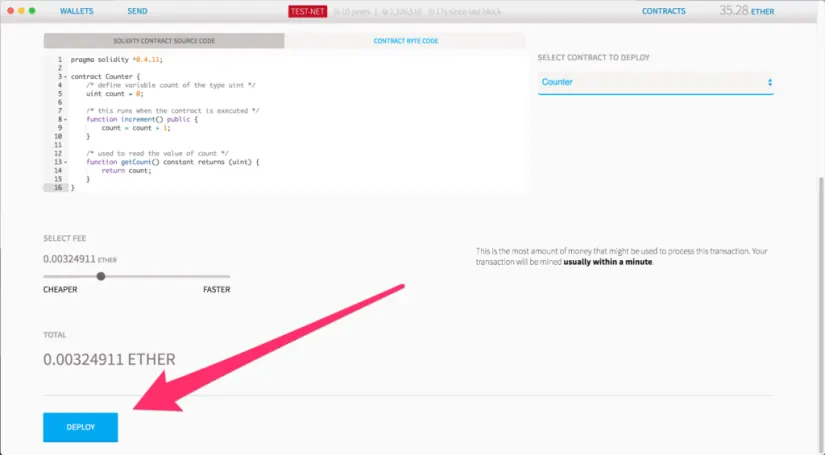
pragma solidity ^0.4.11; contract Counter { /* define variable count of the type uint */ uint count = 0; /* this runs when the contract is executed */ function increment() public { count = count + 1; } /* used to read the value of count */ function getCount() constant returns (uint) { return count; } }To publish our contract on the blockchain, open Ethereum Wallet and go to My contracts.
A wallet design should distinguish signing keys from recovery material; see how Bitcoin private keys and seed phrases work.
Click Deploy a new contract.
In the code text area past our Counter contract code
Social engineering often bypasses otherwise sound code. Compare the attack with the Bitcoin phishing and fraud warning guide.
On the right select the contract you want to publish: our Counter contract.
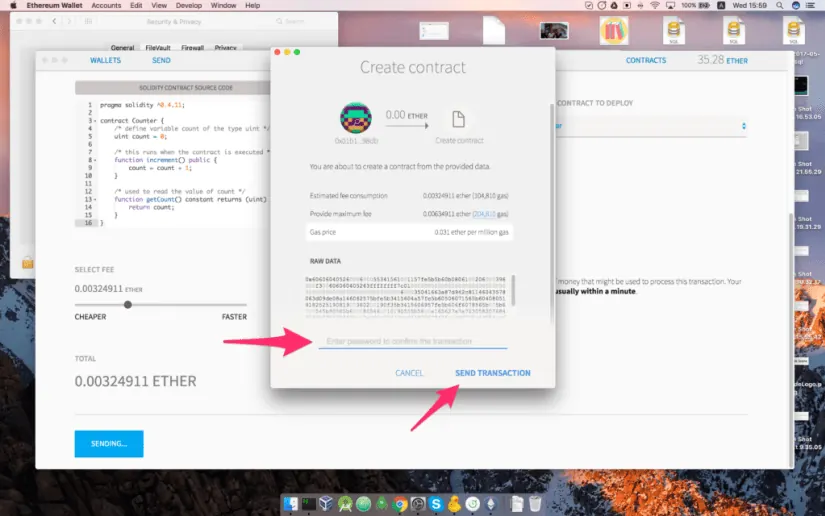
Enter your password and press Send transaction. The gas price is the amount of Ethereum that will be required to publish your contract to the block chain.
You can see the counter value is equal to 0. On the blockchain, it does not cost anything to read a value, that’s why you can see the value displayed here.
Now if you execute our increment function guess what will happen? Our counter value will be equal to 1. That may take some time as the execution of the code must be written in the blockchain when the next block is mined.
If you execute the increment function another time you’ll see the counter value changing!
Congratulations, you published and interacted with your first contract. In the next tutorial we will see how we can improve our contract so only the owner (you) can interact with it.
Turn the example into production evidence
A working demo is the beginning of verification, not the end. Add tests for failure paths, inspect every permission, and record the chain, contract address, compiler, and dependency versions used for the deployment.
Check behavior
Test expected inputs, boundary values, reverts, events, and calls made to other contracts.
Check operations
Plan key storage, monitoring, pause or upgrade authority, and a response if an assumption stops being true.